
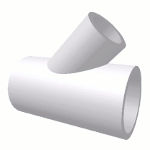
 Essentially, any joint can be thought of as the interaction of two or more shapes. These shapes can be pipes, cones, or flat surfaces (plates). The term "component" will be used when referring to either of these pieces of material coming together to form a joint. The interaction of these components is called a "joint". The simple joint is Digital Pipe Fitter's way of representing that interaction. Many different types of interactions are supported. And more are being developed.
When these components are oriented as desired by the user, the resulting 3d rendered representation of the joint can be viewed and templates of each of the two component parts of the joint can be previewed and printed. There are cases where only one template is available for printing because either both components use the same template or one component doesn't need to be cut to serve its purpose in the joint.
There are a wide variety of simple joints supported by Digital Pipe Fitter and more are being added.
To open a simple joint, use the ‘File - New Joint...' menu item. You can select the joint directly by bringing up a list of available joints (along with pictures) to pick from. Or you can use the ‘File/Open Joint' menu item to open a previously saved joint or project.
You can open multiple joints at the same time to create a project. All joints must have unique names. Digital Pipe Fitter will never allow you to name two joints the same. The unique name is needed so Utility Joints can reference other open joints.